
Snake
Mission Brief
Take a classic arcade loop and engineer it to commercial mobile release quality — solving arbitrary phone aspect ratios, touch-swipe precision, per-tick algorithmic efficiency, and persistent player preferences in a single cross-platform Unity codebase.
Key Systems Engineered
Dual-Structure O(1) Movement & Collision Core (SnakeController.cs)
Represents the snake body as a LinkedList<SnakeSegmentData> paired with a synchronized HashSet<Vector2Int> of occupied grid coordinates. Advancing the head and removing the tail execute in O(1) time (eliminating O(n) array shifting on every tick), while self-collision checks run in O(1) average-case lookup time.
Cross-Platform Buffered Input & Dominant-Axis Swipe Flattening (InputReader.cs)
Unifies Unity New Input System keyboard bindings with custom mobile touch-swipe detection. Swipes exceeding a 50-unit minimum threshold are flattened onto their dominant axis (X or Y) and stored in a single-tick bufferedDirection variable that explicitly rejects illegal 180-degree neck reversals (moveInput != -lastMovedDirection).
Runtime Aspect-Ratio Camera Framing (GridCameraScaler.cs) & Score-Driven Pacing
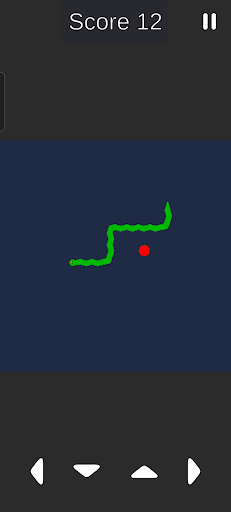
Computes the orthographic camera size dynamically at startup by comparing live device screen aspect ratio against the target grid aspect ratio (including top/bottom UI padding), framing the arena cleanly on any phone or desktop monitor. Tick speed scales linearly with score via tick = Mathf.Max(0.06f, 0.15f - (currentScore * 0.002f)).
Boss Fight: Consistent Arena Framing & Responsive Turn Buffering Across Mobile & Desktop
Fixed-grid games break easily on ultrawide phones or notched displays, and fast players often input two perpendicular turns inside a single movement tick. Computing orthographic camera size from aspect-ratio bounds solved the framing across Android and PC builds (alongside #if UNITY_ANDROID || UNITY_IOS boundary compilation), while decoupling input capture from tick execution via bufferedDirection eliminated dropped turns and accidental 180-degree self-collisions.
Implementation Details

Architecture & Deep Dive
The Snake codebase is structured around a central GameManager that broadcasts game-state transitions (OnGameStateChanged) to decoupled listeners — UI panels, audio, camera shake, and the score system all subscribe independently.
Data Flow
InputReader captures keyboard or swipe input every frame and stores it in a bufferedDirection field. On each movement tick (controlled by GameManager), SnakeController reads the buffered direction, validates it against the current heading to prevent 180° reversals, and advances the snake.
The snake body is a LinkedList<SnakeSegmentData> where advancing means adding a new head node and removing the tail node — both O(1) operations. A synchronized HashSet<Vector2Int> mirrors occupied positions for O(1) self-collision checks.
Camera System
GridCameraScaler runs once at startup: it computes the required orthographic size by comparing the device’s actual screen aspect ratio against the grid’s target aspect ratio, accounting for fixed UI padding at the top and bottom. This ensures the full grid is always visible regardless of device form factor.
AI Attract Mode
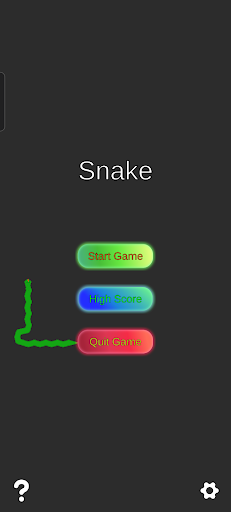
The start menu features a 12-segment AI snake (AISnakeController) running a weighted random walk: 70% chance to continue straight, 30% chance to turn (split 50/50 left/right). It operates on its own death/respawn coroutine loop, completely isolated from the player snake systems.
Media Gallery
Loot & Rewards
- Published and live on the Google Play Store (com.BeerStudios.Snake) with native Android haptic feedback (Handheld.Vibrate() gated by user settings).
- Includes an isolated 12-segment autonomous 'attract mode' AI snake (AISnakeController) on the start menu running a 30% turn / 70% straight weighted random walk with its own death/respawn VFX coroutine loop.
- Persists audio mute, haptics, and live dark/light theme toggles via PlayerPrefs with a static OnThemeChanged event bus.